From the time the internet started it has been touted as the one of the greatest inventions of all times. What started off as a network of machines has grown into a phenomenon and continues to do so at the "speed of thought".
The web which started off serving customers with purely static pages has been continuously moving to a more dynamic and interactive environment. The recent transition has been in moving from a website owner driven web to a user driven one. More and more power is being given to the user to drive things the way he/she wants on the web.
The current wave which we are witnessing, although not intentional has been aptly called Web 2.0.
Web 2.0 is the name given to the array of new age websites which are popping up that are more focussed on bringing people together to one place and allowing them to them to share, discuss, post, vote, form communities etc. ? basically be able to express themselves on the web like they have never been able to do so before.
If you have to go by definitions, Wikipedia : one of the leading new age Web 2.0 site defines the term Web 2.0 as:
Web 2.0, a phrase coined by O'Reilly Media in 2004, refers to a supposed second-generation of Internet-based services : such as social networking sites, wikis, communication tools
, and folksonomies , that let people collaborate and share information online in previously unavailable ways. O'Reilly Media, in collaboration with MediaLive International, used the phrase as a title for a series of conferences and since then it has become a popular (though ill-defined and often criticized) buzzword amongst certain technical and marketing communities.?
Well, then again Web 2.0 might mean different things to different people. Most of the dedicated techies can be heard saying ? a plain social networking site alone is not good enough, it has to support AJAX as well for it to qualify to be a Web 2.0 site. Although AJAX was a starting point of the newer web sites, I think the "social networking and collaboration" bit is the key differentiator.
Although O'Reilly coined the term "Web 2.0", the intention was not to suggest a newer version of the web instead this term was formed to be a part of the core attractive punch-line to be used in of one of the conferences they were going to organize about the web.
Let's talk about some of the Web 2.0 sites that's changing the way we use the web right now. This would ideally give a better understanding of what?s being done on the web in the Web2.0 paradigm.
Web 2.0 top sites
Wikipedia.com : Wikipedia is a web based encyclopedia which is free. Well the surprising part is not that it is free. It can be edited by anyone not necessarily a registered user, which means absolutely anyone. Please try it.
This really epitomizes the beauty of the web. With multiple users editing this site all the time, it only makes us wonder how on earth does this site provide accurate information. Its just like life, the good over evil theory. Works on the web too. There are the good people working tirelessly towards making sure content on Wikipedia is latest and accurate. So even if you enter the wrong data, in some time or worst case in a couple of days you will see the information corrected. The magic of user driven content.
The concept of wikipedia has become so popular that the term "wiki" is now used to refer to any website the visitors can edit the content of the site.
digg.com : This is one of my personal favourites. Just a site which allows you to pull news from anywhere on the web and the digg community can vote for the news posted. The greater the number of posts the higher the chances of it getting listed on the front page of digg.com. Simple, concise to-the-point and well thought out site. But I still can?t relate the site design to the traffic digg has managed to generate. Digg.com has millions of viewers.
youtube.com : Iam quite sure by now everyone has heard about this one. Basically a video sharing website where users can upload videos, view other videos and share videos with other users. Just started in Feb 2005 has managed to create such a huge user base that Google has decided to buy them out for $1.6 billion
flickr.com : What youtube is to videos, flickr is to photos. By the way this is now a Yahoo company.
myspace.com : This is a social networking site where you can create your own space, add friends, share music, videos, photos etc. You can post personal profiles and also blog using myspace. They claim to have 106 million accounts. In July 2005 Rupert Murdoch?s News Corporation bought out myspace.com for $580 million.
del.icio.us : A social bookmarking site which organizes content based on user defined tags. Once registered a user can bookmark any site and tag and share bookmarks with the del.icio.us user community.
New Web 2.0 terms
Wiki : A term given to any website which allows users to directly edit the content of the website and in some cases sometimes without even being a registered user.
Voting : digg.com gave a new meaning to this word in the Web2.0 world. These days users can vote to show their like or dislike for a specific content on a website. It is an important way for a user to exercise his views on the web.
Tagging : Users can now submit a posting and associate tags or keywords with them. Users can define their own tags. Other users who search for a tag and find all relevant postings with that specific tag. Again a user driven way of labelling and searching. This is basically metadata. If the author wants to reclassify the page at a later time, this can easily be done by changing the list of tags.
This process is also referred to as Folksonomy. This concept has been popularised by sites like del.icio.us and technorati.com.
With so many new websites coming up and more and more users flocking to them basking in the new found freedom and power to throw their views, this looks like only the beginning of the very many innovative ways in which users are going to play a bigger role in developing the future of the web.
The arena is open for anyone to network, share views or even start a social networking website and who knows maybe get bought out someday.
Showing posts with label Internet. Show all posts
Showing posts with label Internet. Show all posts
Thursday, November 27, 2008
Live Streaming With the Best Software the World has to Offer
Gigstreams.com is an all new site that provides streaming enthusiast information on the latest and best software the planet has to offer when it comes to live internet streaming. Software for streaming audio and visual content over the Internet is varied. That is why reading reviews in websites such as Gigstream can provide the information you need before installing the software into your computer.
With the advent of the Internet, it has brought a huge amount of traffic that evolved from static text message based web content to a more full flash, rich multimedia content. With this, the multimedia and Internet streaming technology have become an increasingly important building block to many Internet applications, ranging from remote education, digital radio, Internet Protocol TV (IPTV), etc.
www.gigstreams.com , internet users can read reviews and information on the types of streaming software available to users that have been tried and tested by the folks at Gigstreams.com. Each review on the site comes with a screen shot of the software, as well as other added features and benefits that the software has that puts them as among the best.
Users can download each of the software to view movies, TV shows, music, radio channels and even sports such as live football and experience for themselves which software works better for them. The site makes it easier for visitors in finding out the best streaming capabilities by categorizing it into 'Cool Streaming', 'Free Internet TV', 'Music on Demand', 'PPLive', 'Sopcast', and 'Streaming TV'.
Some well known internet streaming softwares that can be found on the website are ZiggyTV, Dish TV, PCTV4ME, PPMate, SopCast, 3WebTotal, and CoolStreaming. Each streaming software has a download link provided to stay users who are interested in that particular software can immediately download by clicking on the link. Each link that is clicked will bring the users to the software's website where they can read in full the capabilities of each software as well as the technical requirements needed for the software to be installed into their computer.
With internet streaming installed in your laptop or PC, you can now enjoy free TV online, get to watch your streaming films on your PC , live football coverage almost anywhere in the world, provided you have a stable internet connection. Getting your scope on the latest is now not confined in front of the TV and at home. Live internet streaming enables users to connect and watch their favorite sitcoms and even live sports coverage even if time zones are not the same. If you are in Africa and would want to watch a live showing of the football in the US, then by using any one of these soft wares can help you get to watch what you want.
About Gigstreams.com: The newly launched Gigstreams.com provides website owners with descriptions of some of the best professional audio and visual streaming software currently available. Professional software is a more desirable path to take over free options as one will be provided with ongoing support and updates, which are an integral part of any web based business.
With the advent of the Internet, it has brought a huge amount of traffic that evolved from static text message based web content to a more full flash, rich multimedia content. With this, the multimedia and Internet streaming technology have become an increasingly important building block to many Internet applications, ranging from remote education, digital radio, Internet Protocol TV (IPTV), etc.
www.gigstreams.com , internet users can read reviews and information on the types of streaming software available to users that have been tried and tested by the folks at Gigstreams.com. Each review on the site comes with a screen shot of the software, as well as other added features and benefits that the software has that puts them as among the best.
Users can download each of the software to view movies, TV shows, music, radio channels and even sports such as live football and experience for themselves which software works better for them. The site makes it easier for visitors in finding out the best streaming capabilities by categorizing it into 'Cool Streaming', 'Free Internet TV', 'Music on Demand', 'PPLive', 'Sopcast', and 'Streaming TV'.
Some well known internet streaming softwares that can be found on the website are ZiggyTV, Dish TV, PCTV4ME, PPMate, SopCast, 3WebTotal, and CoolStreaming. Each streaming software has a download link provided to stay users who are interested in that particular software can immediately download by clicking on the link. Each link that is clicked will bring the users to the software's website where they can read in full the capabilities of each software as well as the technical requirements needed for the software to be installed into their computer.
With internet streaming installed in your laptop or PC, you can now enjoy free TV online, get to watch your streaming films on your PC , live football coverage almost anywhere in the world, provided you have a stable internet connection. Getting your scope on the latest is now not confined in front of the TV and at home. Live internet streaming enables users to connect and watch their favorite sitcoms and even live sports coverage even if time zones are not the same. If you are in Africa and would want to watch a live showing of the football in the US, then by using any one of these soft wares can help you get to watch what you want.
About Gigstreams.com: The newly launched Gigstreams.com provides website owners with descriptions of some of the best professional audio and visual streaming software currently available. Professional software is a more desirable path to take over free options as one will be provided with ongoing support and updates, which are an integral part of any web based business.

Wednesday, November 26, 2008
Internet Security - How To Avoid Being Infected With Spyware
Spyware is more than just annoying - it can cause other programs to not work properly and can cause your computer to become quite unstable. Not to mention the privacy issues it brings up.
Spyware is often installed without your knowledge or consent and in many cases can't be removed from your computer without specialized software tools. When the people that distribute it need to resort to tricking you into installing it, there's obviously very little there to warrant your trust.
The first line of defense against spyware is to be careful installing software. Know what's being downloaded. A large percentage of freeware or shareware programs have spyware embedded in them. Sometimes that's disclosed in the user agreement, but often not.
Check for "spyware free" guarantees on software you download. Obviously, anyone can say something is spyware free even when it isn't, but if a website has gone to the trouble to say so, it is more likely to be safe than if they hadn't.
How can you tell if you have spyware on your system? You may see pop-up advertisements even when you aren't browsing the web. Your homepage may have been changed without your consent. New toolbars are installed on your web browser which you didn't request. Your computer may be sluggish or mysteriously reboot on its own. Though, the last effect is usually a virus.
If you do get infected with spyware, there are ways to get rid of it. A number of companies make software designed to get rid of it. These programs will scan your computer and check through their database of known spyware for any matches. These databases get updated frequently as new forms of spyware are found.
Some of these programs are free while others will cost. The paid versions sometimes have additional features, such as automatic scheduled scans. None of them are 100% foolproof however, so it's a good idea to run more than one of them.
Some kinds of spyware are notoriously difficult to get rid of. They may make changes to your Windows files that help them hide from the scanners. On occasion, you may need to delete them manually to be sure they're gone.
Obviously, this is something that you should only attempt if you are quite knowledgeable. You wouldn't want to remove something that is critical for your computer to operate.
Once the spyware has been removed from your system, you should run scans on a regular basis to keep it clean. Whether you do this manually or use a program that does it automatically on a schedule is up to you (and your pocketbook).
And, of course, beware those tempting looking free offers. You may get more than you bargained for.
Spyware is often installed without your knowledge or consent and in many cases can't be removed from your computer without specialized software tools. When the people that distribute it need to resort to tricking you into installing it, there's obviously very little there to warrant your trust.
The first line of defense against spyware is to be careful installing software. Know what's being downloaded. A large percentage of freeware or shareware programs have spyware embedded in them. Sometimes that's disclosed in the user agreement, but often not.
Check for "spyware free" guarantees on software you download. Obviously, anyone can say something is spyware free even when it isn't, but if a website has gone to the trouble to say so, it is more likely to be safe than if they hadn't.
How can you tell if you have spyware on your system? You may see pop-up advertisements even when you aren't browsing the web. Your homepage may have been changed without your consent. New toolbars are installed on your web browser which you didn't request. Your computer may be sluggish or mysteriously reboot on its own. Though, the last effect is usually a virus.
If you do get infected with spyware, there are ways to get rid of it. A number of companies make software designed to get rid of it. These programs will scan your computer and check through their database of known spyware for any matches. These databases get updated frequently as new forms of spyware are found.
Some of these programs are free while others will cost. The paid versions sometimes have additional features, such as automatic scheduled scans. None of them are 100% foolproof however, so it's a good idea to run more than one of them.
Some kinds of spyware are notoriously difficult to get rid of. They may make changes to your Windows files that help them hide from the scanners. On occasion, you may need to delete them manually to be sure they're gone.
Obviously, this is something that you should only attempt if you are quite knowledgeable. You wouldn't want to remove something that is critical for your computer to operate.
Once the spyware has been removed from your system, you should run scans on a regular basis to keep it clean. Whether you do this manually or use a program that does it automatically on a schedule is up to you (and your pocketbook).
And, of course, beware those tempting looking free offers. You may get more than you bargained for.
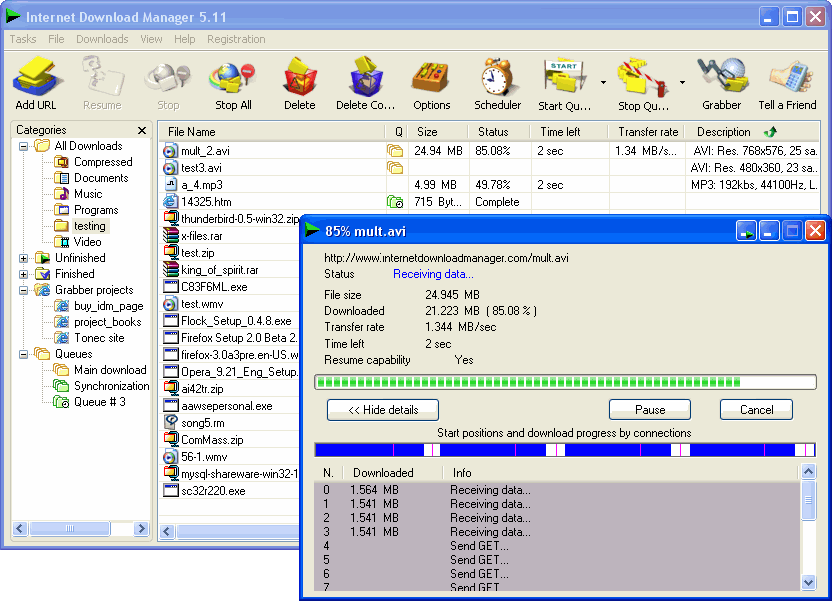
Internet Download Manager v5.15
Internet Download Manager (IDM) is a tool to increase download speeds by up to 5 times, resume and schedule downloads. Comprehensive error recovery and resume capability will restart broken or interrupted downloads due to lost connections, network problems, computer shutdowns, or unexpected power outages. Simple graphic user interface makes IDM user friendly and easy to use.Internet Download Manager has a smart download logic accelerator that features intelligent dynamic file segmentation and safe multipart downloading technology to accelerate your downloads. Unlike other download managers and accelerators Internet Download Manager segments downloaded files dynamically during download process and reuses available connections without additional connect and login stages to achieve best acceleration performance.
Internet Download Manager supports proxy servers, ftp and http protocols, firewalls, redirects, cookies, authorization, MP3 audio and MPEG video content processing. IDM integrates seamlessly into Microsoft Internet Explorer, Netscape, MSN Explorer, AOL, Opera, Mozilla, Mozilla Firefox, Mozilla Firebird, Avant Browser, MyIE2, and all other popular browsers to automatically handle your downloads. You can also drag and drop files, or use Internet Download Manager from command line. Internet Download Manager can dial your modem at the set time, download the files you want, then hang up or even shut down your computer when it's done.
Other features include multilingual support, zip preview, download categories, scheduler pro, sounds on different events, HTTPS support, queue processor, html help and tutorial, enhanced virus protection on download completion, progressive downloading with quotas (useful for connections that use some kind of fair access policy or FAP like Direcway, Direct PC, Hughes, etc.), built-in download accelerator, and many others.
Version 5.15 adds IDM download panel for web-players that can be used to download flash videos from sites like YouTube, MySpaceTV, and Google Videos. It also features complete Vista support, YouTube grabber, redeveloped scheduler, and MMS protocol support. The new version also adds improved integration for IE and IE based browsers, redesigned and enhanced download engine, the unique advanced integration into all latest browsers, improved toolbar, and a wealth of other improvements and new features.

Internet Download Manager supports proxy servers, ftp and http protocols, firewalls, redirects, cookies, authorization, MP3 audio and MPEG video content processing. IDM integrates seamlessly into Microsoft Internet Explorer, Netscape, MSN Explorer, AOL, Opera, Mozilla, Mozilla Firefox, Mozilla Firebird, Avant Browser, MyIE2, and all other popular browsers to automatically handle your downloads. You can also drag and drop files, or use Internet Download Manager from command line. Internet Download Manager can dial your modem at the set time, download the files you want, then hang up or even shut down your computer when it's done.
Other features include multilingual support, zip preview, download categories, scheduler pro, sounds on different events, HTTPS support, queue processor, html help and tutorial, enhanced virus protection on download completion, progressive downloading with quotas (useful for connections that use some kind of fair access policy or FAP like Direcway, Direct PC, Hughes, etc.), built-in download accelerator, and many others.
Version 5.15 adds IDM download panel for web-players that can be used to download flash videos from sites like YouTube, MySpaceTV, and Google Videos. It also features complete Vista support, YouTube grabber, redeveloped scheduler, and MMS protocol support. The new version also adds improved integration for IE and IE based browsers, redesigned and enhanced download engine, the unique advanced integration into all latest browsers, improved toolbar, and a wealth of other improvements and new features.
Check Your Fiber Optic Connectors Like A Professional Installer
What are Fiber Optic Inspection Microscopes?
Fiber optic inspection microscopes are used to inspect the end face of a optical connector or cleaved fiber.
Two types of fiber optic microscopes are popular on the market: fiber optic connector termination inspection and fiber patch panel ferrule inspection.
Magnification levels of fiber scope are available at 200X or 400X for single mode fiber applications, 100X low cost type for multimode applications. The latter is often included in many fiber optic termination tool kits.
What types of flaws or contamination can the microscope see?
With at least 200X magnification you can clearly see scratches, dig, dirt deposit, debris and other contamination on a fiber optic connector.
Desktop video fiber microscope
The typical desktop fiber optic video inspection microscope has a 9" black and white monitor attached to the scope with a 4 feet video cable. So you can place the monitor where it is convenient. Because of its bulk volume, this type of fiber microscope is typically used in production environments and labs. Both 200X and 400X versions are available.
Portable optical fiber scope
This type of microscope with universal adapter is a versatile instrument to inspect fiber optic connectors. They can be used for both multimode and single mode applications. Connectors slide into scope adapter, providing ease of use with or without tripod. 8 degree angle adapter can be used for inspecting angled connectors such as FC/APC, SC/APC, etc. Both 200X and 400X versions are available.
Coaxial Illuminated handheld fiber inspection scope
These low cost microscopes are available in 200x or 400x magnification, and utilize white LED light to provide coaxial illumination to connector end-faces. This method of illumination produces high resolution detail of end face scratches, defects and contamination. It is provided with a universal 2.5mm adapter, with other common connector styles available. These are the natural choice for fiber installation contractors.
Ferrule inspection microscopes
All aforementioned four types of microscopes are for standalone fiber connector inspection. But what about the connectors already installed on patch panels and hardware devices? The ferrule inspection microscopes are the solution.
These video fiber optic microscopes include a handheld LCD display unit and a small, lightweight probe that contains a long-life LED light source and CCD video camera. The probe adapter tip mates with the connector and projects a crisp, clear image of microscopic debris and end-face damage on the LCD display.
Zoom levels of different optical fiber optic microscopes
* 100X
* 150X
* 200X
* 400X
Warnings
* Do not look into a fiber while the system laser is on
* Do not connect a fiberscope while the system laser is on
* Do not touch the end face of the fiber connector
* Lasers used in telecommunication systems are powerful enough to burn contaminants into the fiber end face. Always ensure the laser is turned off while performing the cleaning procedure.
Other special features of popular handheld fiber micrscopes
1. 100X magnification for viewing multimode connectors
2. Includes 2.5 mm connector "Universal Adapter" for FC, ST and SC style connectors
3. Oblique illumination provides good view of ferrule cleanliness and core condition
4. White LED illumination delivers long working life
Fiber optic inspection microscopes are used to inspect the end face of a optical connector or cleaved fiber.
Two types of fiber optic microscopes are popular on the market: fiber optic connector termination inspection and fiber patch panel ferrule inspection.
Magnification levels of fiber scope are available at 200X or 400X for single mode fiber applications, 100X low cost type for multimode applications. The latter is often included in many fiber optic termination tool kits.
What types of flaws or contamination can the microscope see?
With at least 200X magnification you can clearly see scratches, dig, dirt deposit, debris and other contamination on a fiber optic connector.
Desktop video fiber microscope
The typical desktop fiber optic video inspection microscope has a 9" black and white monitor attached to the scope with a 4 feet video cable. So you can place the monitor where it is convenient. Because of its bulk volume, this type of fiber microscope is typically used in production environments and labs. Both 200X and 400X versions are available.
Portable optical fiber scope
This type of microscope with universal adapter is a versatile instrument to inspect fiber optic connectors. They can be used for both multimode and single mode applications. Connectors slide into scope adapter, providing ease of use with or without tripod. 8 degree angle adapter can be used for inspecting angled connectors such as FC/APC, SC/APC, etc. Both 200X and 400X versions are available.
Coaxial Illuminated handheld fiber inspection scope
These low cost microscopes are available in 200x or 400x magnification, and utilize white LED light to provide coaxial illumination to connector end-faces. This method of illumination produces high resolution detail of end face scratches, defects and contamination. It is provided with a universal 2.5mm adapter, with other common connector styles available. These are the natural choice for fiber installation contractors.
Ferrule inspection microscopes
All aforementioned four types of microscopes are for standalone fiber connector inspection. But what about the connectors already installed on patch panels and hardware devices? The ferrule inspection microscopes are the solution.
These video fiber optic microscopes include a handheld LCD display unit and a small, lightweight probe that contains a long-life LED light source and CCD video camera. The probe adapter tip mates with the connector and projects a crisp, clear image of microscopic debris and end-face damage on the LCD display.
Zoom levels of different optical fiber optic microscopes
* 100X
* 150X
* 200X
* 400X
Warnings
* Do not look into a fiber while the system laser is on
* Do not connect a fiberscope while the system laser is on
* Do not touch the end face of the fiber connector
* Lasers used in telecommunication systems are powerful enough to burn contaminants into the fiber end face. Always ensure the laser is turned off while performing the cleaning procedure.
Other special features of popular handheld fiber micrscopes
1. 100X magnification for viewing multimode connectors
2. Includes 2.5 mm connector "Universal Adapter" for FC, ST and SC style connectors
3. Oblique illumination provides good view of ferrule cleanliness and core condition
4. White LED illumination delivers long working life
Tuesday, November 25, 2008
Google Chrome - Review
Seeing how I haven't installed any beta software lately (yeah right), I figured I jump in with everyone else on the net and see what's up with Google's new entry in the browser market. If you haven't heard about Chrome yet, then just do a Google Search on it and you'll have plenty to read for the foreseeable future. The install was small 468k so the download was fast and the install took about 15 seconds so in well under a minute I went from "click" to "play". Not too shabby. So, if you too are interested in giving a new browser a shot, here are a few cool features that stick out

One box for everything
Web search. Web history. Address bar. Suggestions as you type. One unified box serves all your browsing needs.
My Take: This is VERY cool. Ever hated having to enter search terms in a separate edit box in the browser? Not any more, all the features are integrated into the single address/search/history/etc bar.
New Tab Page
Every time you open a new tab, you'll see a visual sampling of your most visited sites, most used search engines, and recently bookmarked pages and closed tabs. Other browsers
My Take: Been there, done that with IE8 and never really found a use for it although some might. There doesn't seem to be a way to configure this on or off but hopefully some day there will be an "about:blank" option for the new tab page.
Application Shortcuts
Use web apps without opening your browser. Application shortcuts can directly load your favorite online apps.
My Take: This feature has been available in FireFox for some time so nothing earth shattering here.
Dynamic Tabs
You can drag tabs out of the browser to create new windows, gather multiple tabs into one window or arrange your tabs however you wish -- quickly and easily.
My Take: This is pretty cool. There have been times I've wanted to re-organize my 30-tab browser session into a couple of windows and this would be a very easy way to do it.
Crash Control
Every tab you're using is run independently in the browser, so if one app crashes it won't take anything else down.
My Take: Not sure how I feel about this one. Each tab runs it's own process and already I've got 4 processes going each at about 30MB or memory usage. How is this going to scale for the 30+tab user. I like the crash protection but splitting windows up across process boundaries might be a better option unless they can reduce the memory footprint on each tab process.
Incognito Mode
Don't want pages you visit to show up in your web history? Choose incognito mode for private browsing.
My Take: This feature ROCKS! Ever worried about clicking on that link that your co-worked forwarded to you? Worry no longer, with Incognito mode, pages viewed will not appear in the browser history and they won't leave any other traces. Not that I would need that feature though...
Safe Browsing
Google Chrome warns you if you're about to visit a suspected phishing, malware or otherwise unsafe website.
My Take: Again, this is in all the other mainstream browsers out there so it's par for the course.
Instant Bookmarks
Want to bookmark a web page? Just click the star icon at the left edge of the address bar and you're done.
My Take: This will likely save the speed-bookmarker some time, but since I rarely create bookmarks I'm not sure how it will impact my day to day experience.
Importing settings
When you switch to Google Chrome, you can pick up where you left off with all the bookmarks and passwords from your existing browser.
My Take: Again, par for the course. They needed to do this to get folks to use it.
Simpler Downloads
No intrusive download manager; you see your download's status at the bottom of your current window.
My Take: This is another one that is awesome in my opinion. I HATE the downloads window with a passion so this will likely be a nice feature to avoid that extra popup hitting me in the face every time I download a file.
Developer Tools
Included in the menus, are the developer options of "View Source", "Debug Javascript", "Javascript console", and "Task Manager".
My Take: Since they wrote their own Javascript engine for this release, they better darn well have a Javascript debugger in there. The Task Manager (Shift+ESC) is a nice little feature that will show you the memory usage for each component in the Chrome environment (windows, tabs, plugins, etc). If you are big into stats, then check out the "about:memory" shortcut where you can get all the memory details of each of the tasks. With all this, it still falls way short of the WebDeveloper plugin for FireFox. Until more debugging tools come into play, it'll be hard to pry me from FireFox.
Configuration
The browser was built with simplicity in mind and there are only a very small set of configuration options to worry about.
My Take: In the configuration window there are 3 tabs with only a handful of settings total such as proxy server settings, search engine defaults, password preferences, and download locations. I say AMEN to this one as I find it hard to believe anyone needs all gazillion settings that are in IE and FireFox.
Final Thoughts
The best features by far are the Incognito Mode, Single Address/Search/History bar, and the new download manager. Oh, and it's pretty snappy to boot. But, to get me to switch full-time, there'll have to be some more developer tool integration. But, keep in mind that this is a beta project so I have high hopes that FireFox will finally have met it's match.

One box for everything
Web search. Web history. Address bar. Suggestions as you type. One unified box serves all your browsing needs.
My Take: This is VERY cool. Ever hated having to enter search terms in a separate edit box in the browser? Not any more, all the features are integrated into the single address/search/history/etc bar.
New Tab Page
Every time you open a new tab, you'll see a visual sampling of your most visited sites, most used search engines, and recently bookmarked pages and closed tabs. Other browsers
My Take: Been there, done that with IE8 and never really found a use for it although some might. There doesn't seem to be a way to configure this on or off but hopefully some day there will be an "about:blank" option for the new tab page.
Application Shortcuts
Use web apps without opening your browser. Application shortcuts can directly load your favorite online apps.
My Take: This feature has been available in FireFox for some time so nothing earth shattering here.
Dynamic Tabs
You can drag tabs out of the browser to create new windows, gather multiple tabs into one window or arrange your tabs however you wish -- quickly and easily.
My Take: This is pretty cool. There have been times I've wanted to re-organize my 30-tab browser session into a couple of windows and this would be a very easy way to do it.
Crash Control
Every tab you're using is run independently in the browser, so if one app crashes it won't take anything else down.
My Take: Not sure how I feel about this one. Each tab runs it's own process and already I've got 4 processes going each at about 30MB or memory usage. How is this going to scale for the 30+tab user. I like the crash protection but splitting windows up across process boundaries might be a better option unless they can reduce the memory footprint on each tab process.
Incognito Mode
Don't want pages you visit to show up in your web history? Choose incognito mode for private browsing.
My Take: This feature ROCKS! Ever worried about clicking on that link that your co-worked forwarded to you? Worry no longer, with Incognito mode, pages viewed will not appear in the browser history and they won't leave any other traces. Not that I would need that feature though...
Safe Browsing
Google Chrome warns you if you're about to visit a suspected phishing, malware or otherwise unsafe website.
My Take: Again, this is in all the other mainstream browsers out there so it's par for the course.
Instant Bookmarks
Want to bookmark a web page? Just click the star icon at the left edge of the address bar and you're done.
My Take: This will likely save the speed-bookmarker some time, but since I rarely create bookmarks I'm not sure how it will impact my day to day experience.
Importing settings
When you switch to Google Chrome, you can pick up where you left off with all the bookmarks and passwords from your existing browser.
My Take: Again, par for the course. They needed to do this to get folks to use it.
Simpler Downloads
No intrusive download manager; you see your download's status at the bottom of your current window.
My Take: This is another one that is awesome in my opinion. I HATE the downloads window with a passion so this will likely be a nice feature to avoid that extra popup hitting me in the face every time I download a file.
Developer Tools
Included in the menus, are the developer options of "View Source", "Debug Javascript", "Javascript console", and "Task Manager".
My Take: Since they wrote their own Javascript engine for this release, they better darn well have a Javascript debugger in there. The Task Manager (Shift+ESC) is a nice little feature that will show you the memory usage for each component in the Chrome environment (windows, tabs, plugins, etc). If you are big into stats, then check out the "about:memory" shortcut where you can get all the memory details of each of the tasks. With all this, it still falls way short of the WebDeveloper plugin for FireFox. Until more debugging tools come into play, it'll be hard to pry me from FireFox.
Configuration
The browser was built with simplicity in mind and there are only a very small set of configuration options to worry about.
My Take: In the configuration window there are 3 tabs with only a handful of settings total such as proxy server settings, search engine defaults, password preferences, and download locations. I say AMEN to this one as I find it hard to believe anyone needs all gazillion settings that are in IE and FireFox.
Final Thoughts
The best features by far are the Incognito Mode, Single Address/Search/History bar, and the new download manager. Oh, and it's pretty snappy to boot. But, to get me to switch full-time, there'll have to be some more developer tool integration. But, keep in mind that this is a beta project so I have high hopes that FireFox will finally have met it's match.
Subscribe to:
Posts (Atom)


